
Using the viewer
The viewer is a browser over one model, read-only unless you switch on edit mode. Every click is an htmx request for /view/{iri}, and the server picks a renderer from the seam:notation of the model the element belongs to. This page walks the canonical descent through the chat-app example, then explains the parts of the page and the URLs behind them.
The screenshots were taken from the running viewer in October 2026.
The descent
Architecture
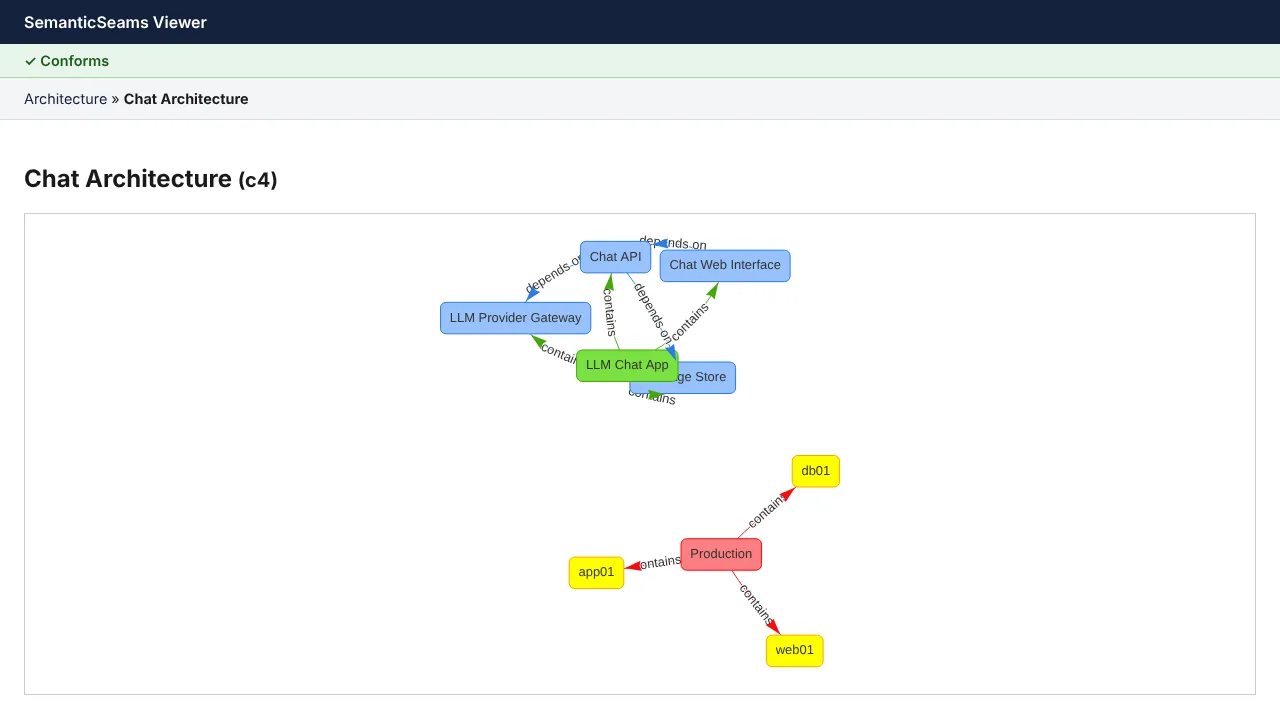
The root of the chat app is its C4 architecture model: a system with four containers, and the production environment with the nodes they are deployed to. The green bar above the breadcrumbs is the model-health badge.
The architecture view has four zoom levels, chosen with the level toggle above the canvas or ?level= in the URL (default L2). Each level adds to the one before:
| Level | Shows |
|---|---|
| L1 System context | Systems, people and environments, with container edges rolled up to them; domains as frames around the systems and bounded contexts they arch:contains, labelled with their classification, and a runs edge from each context to each system whose containers present or execute its models (ADR-0030) |
| L2 Containers | Containers nested in their system, deployment nodes in their environment, depends on and deployed to edges |
| L3 Components and operations | The operations each container seam:exposes, nested in it, and consumes edges |
| L4 Seams | The targets of nest-mode seams nested in their source: the IFML model a container seam:presents and the process it seam:executes, each holding its model's top-level members in that layer's colour |
L4 is the nest reveal mode applied to the whole diagram: every seam predicate whose seam:reveal is nest draws its target inside its source instead of as a separate view. The nested models' own edges are not drawn. Clicking a nested model still opens it.
A model that declares no arch:Domain draws L1 as systems, people and environments only. Domains and contexts, once declared, stay visible at every level, since levels are cumulative.
Interface
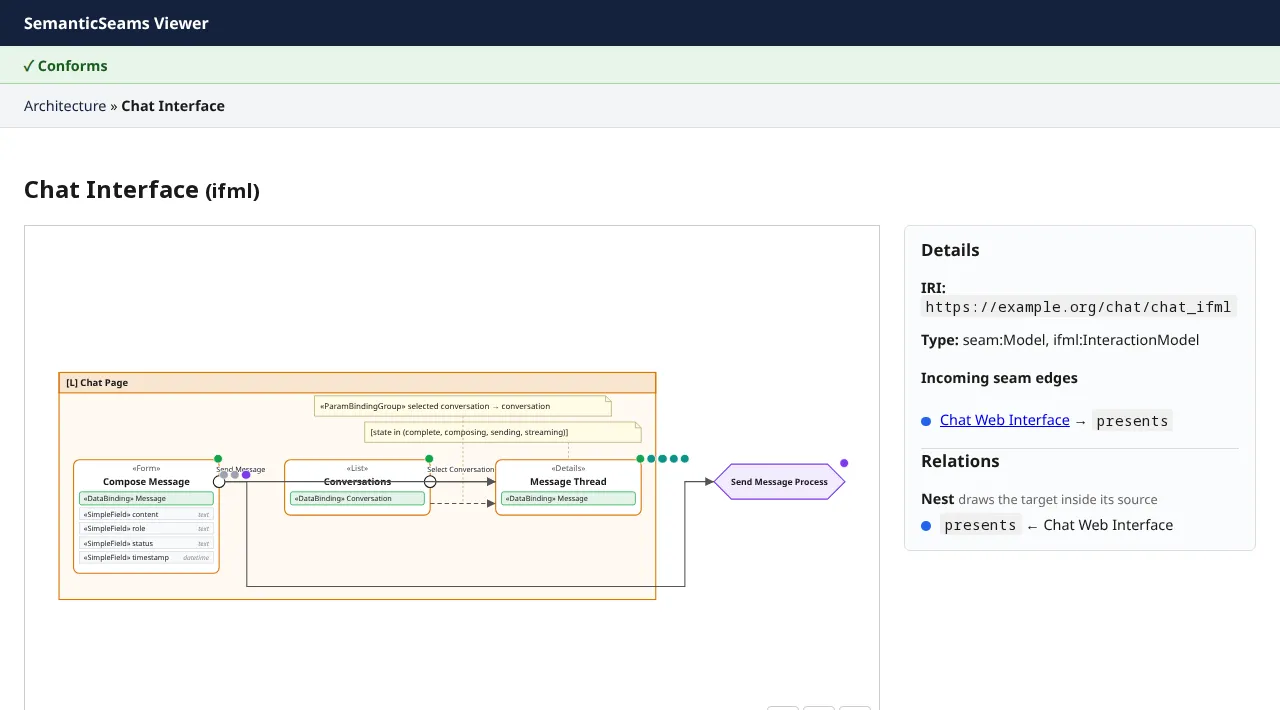
Clicking Chat Web Interface follows seam:presents to the IFML model the container presents, drawn in IFML notation: the chat page container, its «List», «Details» and «Form» components with their data bindings and fields, the events on their right border, the Send Message Process action, and the navigation, data and action flows between them. Drag to pan and use the +, − and fit buttons to zoom. Seam badges sit on the elements; click an element or a badge to follow it.
Process
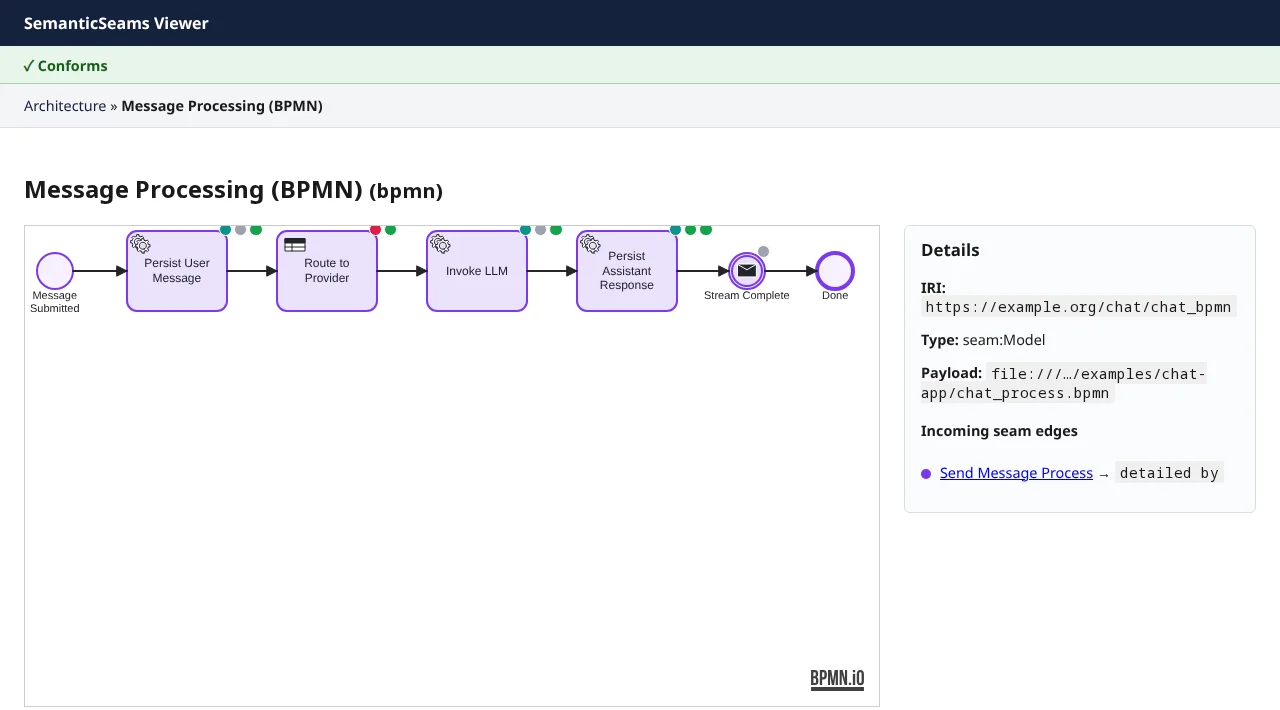
Clicking Send Message follows seam:triggers to the process the event starts, and one more hop along seam:detailedBy to the BPMN model that details it. The diagram is the native XML, drawn by bpmn-js. Clicking a task that takes part in a seam navigates again; a task's element ID in the XML is the fragment of its IRI in the graph.
The shapes take the process layer colour. Each task with a seam carries small badges at its top edge, one per seam, coloured by the layer the seam leads to. Clicking a badge follows that seam, and hovering one names it.
A choice
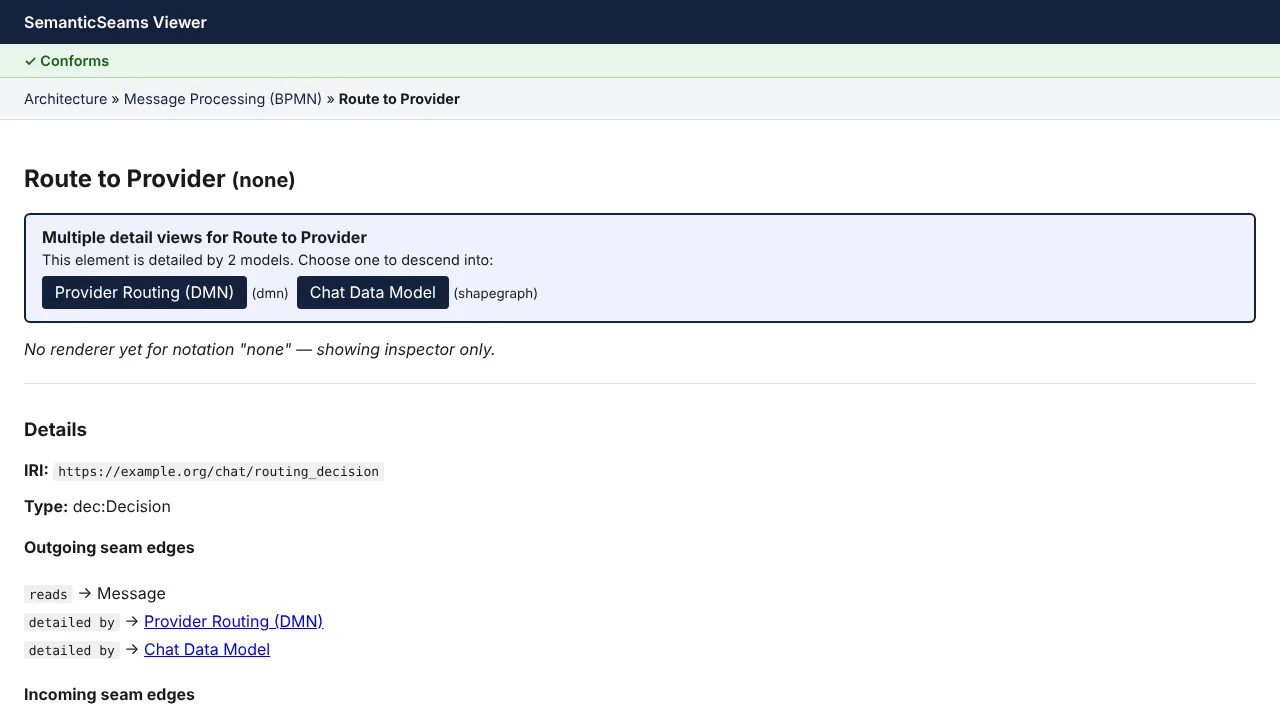
The Route to Provider task is seam:decidedBy a decision that is detailed by two models: the DMN decision model and the chat data model. Rather than pick one, the viewer lists both with their notations and lets you choose.
Decision
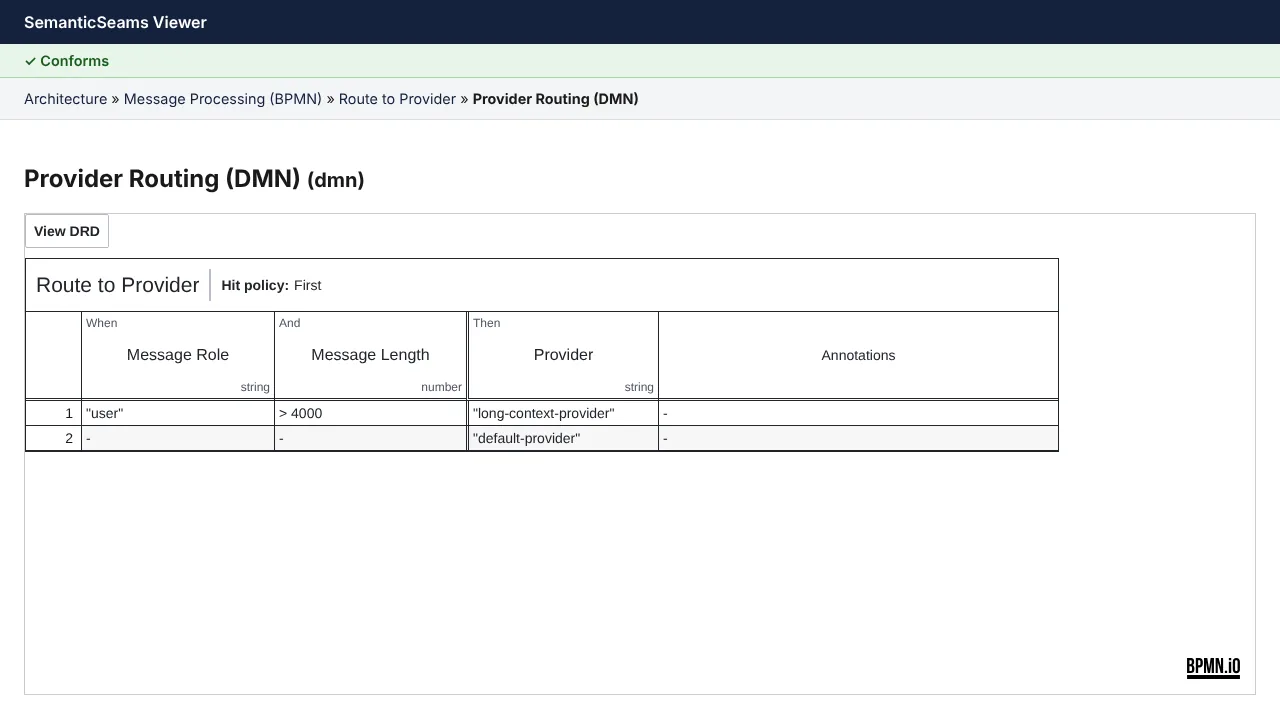
The DMN model opens in dmn-js. From its decision requirements diagram you can open the decision table; clicking the table's name returns to the decision it stands for.
The decision diagram takes the decision layer colour, and the table's name carries a decision-coloured edge. Like the BPMN tasks, the decision carries one badge per seam, coloured by the layer the seam leads to; clicking a badge follows that seam. A seam back to the model you are already viewing gets no badge.
A question
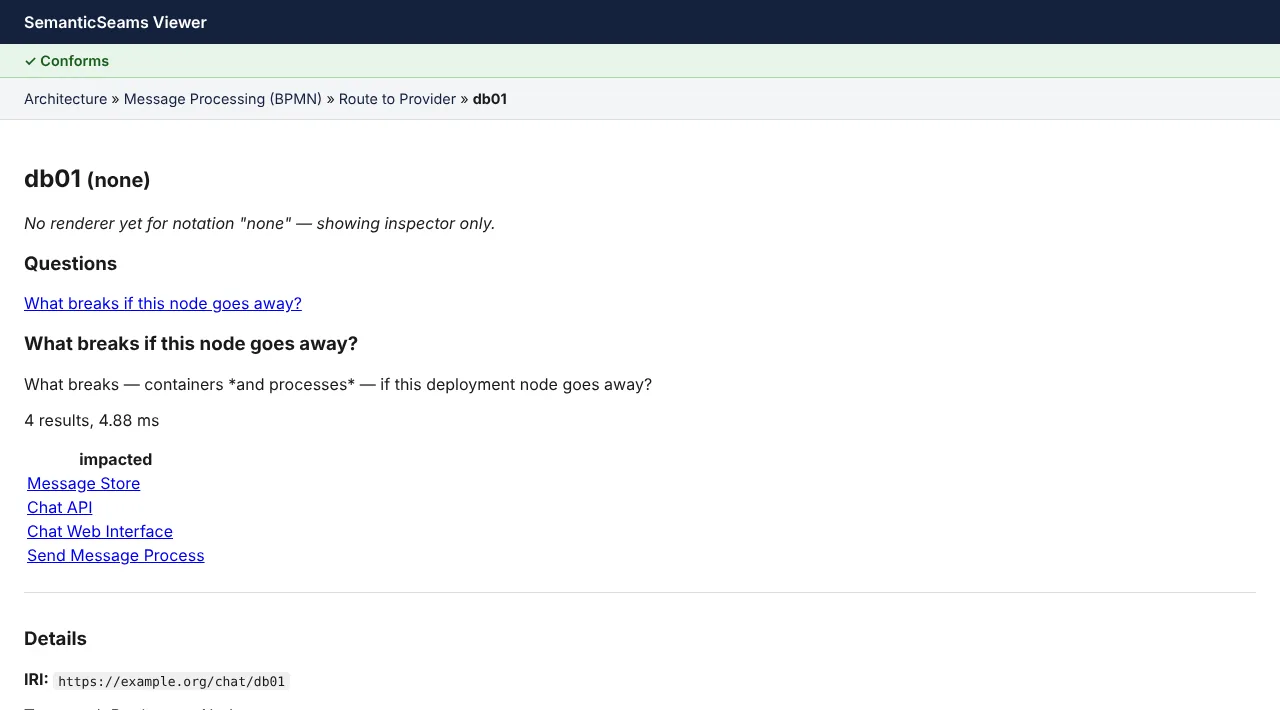
Some elements have canned questions. On a deployment node, What breaks if this node goes away? runs one SPARQL query and lists the containers, the process and the data that depend on it, each linked to its own view. On the chat app's db01 that is six results: the message store, chat API, web interface, send-message process, and the Message and Conversation shapes stored in the message store (seam:storedIn, ADR-0011).
The parts of the page
Model-health badge. Every page validates the whole model against the seam shapes and runs the storage checks of ADR-0011 (ModelGraph.store_health()). It reads Conforms, or a count of violations that opens into a list naming each failing element. A store the runtime could not resolve, such as a written shape with no seam:storedIn or a store with an unsupported deploy:storeKind, counts as a violation. A store container no shape is seam:storedIn adds an amber warning count with its own list, and a model that declares no store gets a note that the runtime keeps embedded SQLite at SEAMS_DB. The model review checks of seams check (seams.review_findings()) add one warning each: lifecycle state labels copied into a sh:in list, a sh:class that points at a shape, a shape with no sh:targetClass and a sh:path nothing declares a property. Each names the shape or path (the focusNode) and the fact (the path); the chat app shows eleven of them. A serving container with more than one deploy:replicas on a store that is not PostgreSQL is a violation (ModelGraph.replica_health(), ADR-0038), since its replicas would not share process state. The static decision checks (seams.decision_findings()) add one warning each too, listed just before the review warnings: a DMN typeRef the input's sh:datatype does not fit, a gateway condition reading a variable nothing upstream sets, and, for a UNIQUE decision table, each pair of rules that match the same input and the first input no rule matches, with an example value. A shape result of severity sh:Warning, which is how a deprecated vocabulary term is flagged (ADR-0021), is listed first among the warnings, not counted as a violation. Warnings and notes leave the badge at Conforms, and a review or decision check that fails is itself one warning. A lifted IRI whose fragment is no id in its model's BPMN or DMN XML (ADR-0002 rule 4), such as a seam edge left pointing at a task removed from the diagram, is listed under Lifted IRIs missing from the XML with its own red count; a payload file that is missing or not well-formed XML is one entry naming the file. These findings leave the SHACL verdict as it is. Every committed example has none. A model with a seam:Ontology graph (ADR-0022) lists each owl:imports beside the badge. One that resolves names the vendored version it resolves to (Import: gistCore14.0.0 (vendored)). One that does not, an unknown IRI or another gist version than the one in ontology/vendor/, is shown in red with the ResolutionError facts: the ontology, owl:imports and what was expected. The viewer loads with the import check off, so the model still opens and the class view still draws the model's own classes, where seams check and seams generate refuse it. A superclass declared neither in the ontology nor in a resolved import (a mistyped gist:Transation) is one warning naming the class; none is given for an ontology whose import does not resolve, since the import fault already explains it. Neither changes the badge. The JSON view's modelConformance carries the same violations, warnings and notes, the lifted-IRI findings as liftedIris, and, for a model with an ontology, each import's status as ontologyImports.
Breadcrumbs. The path you clicked, not a fixed hierarchy: the same element can be reached from more than one parent. Each crumb is a link back.
The canvas. Which renderer you get depends on the notation:
| Notation | Renderer |
|---|---|
| C4 architecture | Nested SVG cards laid out by ELK, with the zoom levels above |
| IFML interaction | IFML notation on diagram-js: pan, zoom, seam badges; events on ELK ports, layout computed on the server; a modeler in edit mode |
| Statechart | A node-link graph drawn with vis-network |
| BPMN | bpmn-js, from the model's native XML payload, tinted with the process colour and badged per seam |
| DMN | dmn-js, from the model's native XML payload: the decision diagram, tinted with the decision colour and badged per seam, and its tables |
| SHACL shape graph | The same ELK card renderer as C4: a frame per node shape, a card per property shape with its datatype (or target shape) and cardinality, and an edge for each sh:class/sh:node reference to another shape. A shape with no detail model of its own (e.g. ConversationShape) shows its model's shape graph with itself highlighted |
| Ontology (class view) | The same ELK card renderer: a card per owl:Class with its label and skos:definition, the properties whose rdfs:domain it is nested inside it with their range, and a subClassOf edge to each superclass. A gist superclass is a grey, dashed, read-only card labelled from the vendored file; a superclass declared nowhere is an Undeclared class card. A click on a class shows its ontology's class view with the class highlighted |
Questions. The canned queries that apply to the focused element's type, as buttons. Results appear inline with each value linked. The catalog is on the query reference. A model view also offers the questions of each element seam:detailedBy it, with the element's name in the button, because a click on such an element lands on its model. The coverage questions work this way: a statechart asks Which transitions does nothing fire?, an ODRL policy Which permissions have no deny test?, and a BPMN view Which paths does no scenario run? (Expense Approval) for its process. That last one lists each start-to-end path as its start, its end and the BPMN ids in between, from seams.coverage rather than SPARQL, since sequence flows live only in the BPMN XML.
Sequences. Beside Questions, links to the derived sequence diagrams of the IFML events the view is about. An IFML model lists its events. The BPMN process view that a click on an event lands on lists that event, e.g. Send Message on the Message Processing view. An event that opens in the inspector lists itself under Details. A link draws one Mermaid diagram per path through the process's exclusive gateways, headed by the flows it takes (single when there is no choice). Each diagram's gaps, the seams the model does not declare yet, are listed under it.
Storm. Beside Sequences, links to the derived event storm of the processes the view is about: a process's own BPMN view, the BPMN view that a click on its triggering event lands on, and an IFML model whose events trigger one, e.g. Expense Approval from Submit Expense in chapter 10. A process started only through a channel, such as Expense Payout, links from its own view. A link draws the timeline the seams storm command prints: each step with its actor, command, aggregate, domain event, decision, channel and started-process notes, then the read models and the gaps.
Details. The inspector: the element's IRI, its types, its native element ID and payload where it has them, and its outgoing and incoming seam edges with readable predicate labels. Edges along a navigational predicate are links. A data shape that says where its rows live lists a stored in edge to its store, e.g. MessageShape stored in Message Store.
Relations. Under Details, the same seam edges grouped by the reveal mode each predicate declares in ontology/seam.ttl (seam:reveal). Open edges replace the view with the target's model. Nest edges (presents, executes) draw the target inside its source. Layer edges overlay the target on the view; in the per-element view a layer row is a plain link to the target, resolved like any click, and the layer mode page draws them all at once. Each row shows the other end's layer colour, the predicate, an arrow for direction and the label. Empty groups are left out.
Generated. In the inspector, the generated files whose trace sidecars cite the element, each with the number of its lines that do, e.g. ConversationShape in generated/chat_api.py and two templates. The heading and each row open the generation view, a row on that file's first citing line. An element no generated line cites has no Generated section.
Generation view
/generation/{iri} shows how one element became code, read from the <output>.trace.json sidecars seams generate writes beside each output (ADR-0019) and listed in seams.lock. It is read-only, except for write-back in edit mode, and has three panes:
- Model: the element, then every model term the shown output cites, each with its layer colour, its qname and how many of the output's lines cite it.
- Template: the source of each template the shown output came from, with the lines behind the selected output line marked.
- Output: the generated file, one row per line. Lines citing the element are marked, and the selected line is highlighted.
Click an output line, a template line or a model term and every line the trace links to it is highlighted in the other two panes. Below the panes, the fan-out lists every generated line, in every output, that cites the element, grouped by file with its generator. Each entry opens the view on that file and line (?output=…&line=…); with no query the view opens the first citing line.
Nothing here fails on a bad file. A missing seams.lock, a missing or malformed sidecar, an output that cannot be read and a template that cannot be found are each one notice above the panes naming the file, and the rest of the view is built without it. An element no generated line cites gets a notice saying so and no panes. Outputs of a generator with no trace hook have no sidecar by design and get no notice. The index is read once per viewer process, so regenerate and restart the viewer to see new traces.
When seams.lock records drafts accepted by seams propose (ADR-0020), an LLM drafts list sits above the fan-out. Each row gives the draft's file, its service task, provider and prompt template, and its state, found by the same comparison seams check makes: current; stale when the task's context hash no longer matches the record (a model fact the draft depends on changed); hand-edited when the file's sha256 differs or the file is missing; or both. A malformed draft record is one notice naming seams.lock.
Layer mode
/layers (the Layers link in the page header) draws the whole loaded model at once as six stacked planes, one per layer, top to bottom: architecture, interaction, process, decision, data and lifecycle. Each plane holds its layer's elements, laid out by ELK, with the edges between them, and is tilted by a simple oblique projection so the planes read as a stack. The cards stay upright so their labels stay readable.
Seams. The lines between planes are the seams that cross layers, coloured by the layer they start in. Which ones show is set by the Seams shown checkboxes, one per reveal mode (seam:reveal, see How a click is resolved). Only layer seams are on at first, since those are the ones the flat views never draw. Open seams (dashed) and nest seams (dotted) can be switched on. An open seam that ends at a model is drawn to that model's name in the plane title.
Hover. Hovering an element, or a model name in a plane title, lights it, every seam it takes part in, and the element at the far end of each, in any reveal mode, even one that is switched off. That traces one element through the stack without clicking.
Plane titles. A plane's title opens that layer flat: it links to the layer's first model in /view, and the layer's other models are listed beside it, each a link of its own. A click on an element opens it in /view, resolved like any click.
Elements in no layer. An element in no model, or in a model whose notation maps to no layer, is not drawn. It is listed above the canvas, with the reason, rather than dropped silently, and so is a seam end that falls outside the six layers.
The page works for any model the viewer loads, including one with several models per notation, such as the expense app's final checkpoint (examples/expenses/chapter-08/expenses.trig). Add format=json, or send Accept: application/json, for the same data as JSON: layers (per layer its id, label, models, nodes and within-layer edges), seams (each with source, target, predicate, reveal, sourceLayer and targetLayer) and warnings.
Data health
/data-health (the Data health link in the page header) checks a running app's data, not the model. It reads the SQLite store named by SEAMS_VIEWER_STORE, opened read-only, so the viewer creates and writes nothing, and runs the attached domain profile's instance-data rules on it: the profile's sh:Warning shapes with a sh:sparql constraint (ADR-0036). The stored entities are lifted to RDF through their shape contracts and checked by seams_runtime.data_health, the function Runtime.data_health calls, so the viewer lists the same findings the runtime logs, sorted, one row per warning with its rule, focus and message.
SEAMS_MODEL=examples/expenses/chapter-11 SEAMS_VIEWER_STORE=/tmp/seams.sqlite \
  uv run uvicorn viewer.app:app --port 8000
In chapter 11 an expense paid twice shows as one warning of the DDD profile's paid-once rule, naming the expense; both payments stay stored. The view is computed on every request, since the store changes under the viewer, and Refresh swaps it in place. Without SEAMS_VIEWER_STORE the view says no store is configured; a model with no profile has no rules to check. A store file that is missing or is not a seams store, a profile that does not resolve, or a stored entity its shape contract refuses is shown as an error naming it, not a page failure. Add format=json for state, store, profile, error, count and findings as JSON.
How a click is resolved
Navigation follows ADR-0005. The viewer does not keep its own list of navigational predicates. Each seam predicate declares a reveal mode (seam:reveal) in ontology/seam.ttl, and a predicate whose mode is open or nest navigates. Today that is seam:detailedBy, seam:triggers, seam:completedOn, seam:decidedBy and seam:lifecycle (open), and seam:presents and seam:executes (nest). Every other seam predicate is layer, so it shows in the inspector but does not navigate. The JSON view gives each seam edge its reveal mode beside navigational. When you click an element:
- If it is detailed by exactly one model, the viewer opens that model.
- If it is detailed by more than one, the viewer shows the choice.
- If it has no detail of its own but a navigational edge leads to something that does, the viewer follows that one extra hop. It never goes further, so you never cross two layers without seeing the step between them.
- Otherwise it opens the inspector for the element. A SHACL node shape with no detail model of its own (e.g. ConversationShape) also gets its model's shape graph on the canvas, with itself highlighted; the JSON view still reports its notation as none. An
owl:Classof aseam:Ontologymodel gets its model's class view the same way.
Edit mode
Edit mode is off by default. Start the viewer with SEAMS_EDIT=1 beside SEAMS_MODEL to switch it on (ADR-0017). Saves change the model's files, so point it at a copy when you only want to try it:
cp -r examples/expenses/chapter-08 /tmp/chapter-08
SEAMS_MODEL=/tmp/chapter-08 SEAMS_EDIT=1 uv run uvicorn viewer.app:app --port 8000
Any other value, or none, leaves the viewer read-only and the edit routes do not exist.
Forms come from the shapes. When some shape targets the element in view, its inspector shows an Edit button. The form it opens has one field per property the shapes give a path to: the seam shapes in ontology/shapes/seam-shapes.ttl, the same ones the health badge checks, and any shapes in the model itself, through every SHACL target kind. A field takes its name from sh:name or the property's label, offers a list for sh:in and a checkbox for xsd:boolean, and shows a text input per value otherwise. A value that is a blank node is shown but not editable here.
Invalid values are saved and flagged. A save never refuses a value for breaking a shape (principle 5). A value that does not fit sh:datatype, or one value too many, is written as typed, and the health badge at the top of the page turns red with the new violation as soon as the save returns. Only faults the writer cannot express are refused, such as a malformed IRI: the form names the subject, the predicate and the reason, and nothing is written.
Only seams_edit writes. Each save is a seams_edit patch applied to the model's own TriG files, so the diff is the changed triples, comments and layout are kept, and the viewer never opens a model file for writing itself. The server log records each save with the element, the field, the file and the quads added and removed.
Undo. After a save, an Undo button reverses the newest edit of the session, byte for byte, and reloads the page. The history is held in memory, so it ends when the viewer stops. Done closes the form and shows the refreshed view.
BPMN and DMN open in the modelers. In edit mode a BPMN view loads the bpmn-js modeler and a DMN view the dmn-js modeler in place of the viewers, with a bar above the canvas. Edit the diagram there as in any bpmn.io tool, then press Save: the modeler's XML goes to POST /edit/payload/{model}, and seams_edit checks it is well-formed and writes it over the payload file. XML that does not parse is refused with a message naming the file and the reason, and nothing is written.
Renaming an element id rewrites its seam edges. Select an element, type the new id in the bar's Element id field and press Rename id, then Save. Because a lifted element's IRI is the model IRI plus its id (ADR-0002), the save renames it everywhere at once: the id and every reference to it in the XML (sourceRef, targetRef, href="#…", bpmnElement and the rest), every quad in the seams graph whose subject or object is the old IRI, and a decision's dec:payloadElement when it names the old id. On the chat app, renaming persist_user_msg in the message processing model moves its seam:inModel, seam:invokes, seam:writes and seam:fires edges to the new IRI. An id that is not in the XML, or a new id already in use, is refused naming the element, and any rename the save had already written is rolled back. The XML and the TriG files change together or not at all, and the server log records each save with its renames and the files touched. After a save the page reloads; one Undo reverses the whole save, renames included, byte for byte. An id changed in the XML outside the viewer does not move the seam edges, and the health badge then lists the old IRI under Lifted IRIs missing from the XML.
IFML editing
In edit mode the IFML view is a diagram-js modeler. A bar above the canvas holds a Name of a new element field, Undo and a status line; the canvas gets a palette and, on the selected element, a context pad. Each gesture is one change to the model:
| Gesture | Change |
|---|---|
| Drag ViewContainer, List, Details, Form or Event from the palette into its parent | Creates the element, named from the bar's field (or a prompt when it is empty). A view container goes on the canvas or into another container, a component into a container, an event onto a container or component. |
| NavigationFlow in the palette, or the context pad's connect on an event, then drag to a container or component | Connects the event to it with an ifml:NavigationFlow. |
| Drag a container or component into another container | Moves it there: the ifml:contains triple changes, and so does the component's ifml:order when the new container already uses it. |
| Click a form's field row, then the pad's − field | Removes that property from the shape the form seam:writes, with each form input ifml:boundTo it on a form that writes the shape. |
| The pad's trash on an element or a flow | Deletes it with what it contains, its events, and every flow from or to any of them. |
A new element's IRI is its name in its parent's namespace (ADR-0002), so a name already in use is refused. A drag that stays inside the same container saves nothing: positions are computed from the model, not stored in it. Selecting an element opens its form from the shapes below the canvas, as the Edit button does elsewhere.
Each gesture posts one op to POST /edit/ifml/{model}. The server builds a seams_edit patch, writes it, puts it on the undo stack and answers with the redrawn diagram, the health badge and the live preview, so the canvas, the badge and the generated pages update together. The status line names the op, the element and the quads each file gained and lost. An op the model cannot take is refused: the status line shows the subject, the predicate and the reason, nothing is written, and the canvas stays as it was. The server log records each op with its kind, the element, the files and the quad counts, and each refusal with the same three facts.
What the diagram does not make, the forms do: a new page needs its ifml:path and ifml:title, and a new List or Details its seam:reads, before the htmx generator can render it, and the live preview names the missing fact until then. The htmx generator also expects one navigation flow per event, so wiring a second flow from an event shows as a lenient fault in the preview.
Live preview
In edit mode a preview pane sits beside the view. It runs the generators of the seams.toml project beside the loaded model on the model as it is now, in lenient mode and in memory: nothing is written, so the committed generated/ files and seams.lock do not change. The pane lists each output by its path in the project, with the generator that wrote it and its text, so after a save you can open the regenerated page and read the change. A save from a form sends the refreshed pane back with the form, next to the refreshed health badge; a BPMN or DMN save and Undo reload the page, which loads the pane again.
When a generator cannot produce an output for the edited model, the pane turns amber and says lenient, with one line per fault naming the generator, the reason, the subject and the predicate; the other outputs are still listed. On the expense tutorial, pointing the My Expenses list's seam:reads at a shape the model does not describe flags the htmx generator's fault. A model with no seams.toml beside it shows no project and the reason instead. The server log records each preview with the project, the number of outputs and faults, and how long it took.
Write-back from output
In edit mode the generation view's output pane can change the model. Below the output sits a one-line editor holding the selected line; click another line to edit that one instead. Change the text and press Preview write-back. Nothing is written yet: the viewer works out which model fact the edit stands for and whether the model, changed that way, would generate exactly what you typed.
One literal, or a refusal. The changed span is what lies between the line's unchanged start and end. The viewer looks at the model terms the line's trace cites (ADR-0019) and their literal values, and keeps the ones written on the old line over the whole span. Exactly one must remain. On the chat app, changing <title>Chat</title> to <title>Chat room</title> in a page template finds :chat_page ifml:title "Chat"@en and drafts a patch that replaces that one triple with "Chat room"@en, keeping the language or datatype and the named graph. When no literal covers the span, or more than one does (the Send Message button's line is covered by three), the edit is refused, and the refusal lists the candidates in sorted order. Only literal values can be written back this way: labels, titles, paths. An edit to fixed template text, or a structural change, is refused.
The edit must regenerate to itself. The viewer applies the patch to a temporary copy of the model and runs the seams.toml project's generators on it. The output you edited must come back equal to your edit. The model-hash lines differ as well, and they are not counted. When the output comes back different, the edit is refused and the first differing line is named. Typing a raw & into a page template is refused this way, for example, because the template escapes it to &. A generator fault on the patched model is also a refusal. The model's own files are never opened during this check.
Effects come first. A drafted write-back shows the patch triple, the files it touches, and every other output line that the same patch changes, as before and after pairs. Renaming the Conversations list in the chat app also changes a line in conversation_list.html. Read them, then press Apply to the model.
Apply checks again. Apply runs the whole check again on the model as it is now, so a preview left open across other edits cannot write a patch that no longer reproduces the edit. The patch is then written through seams_edit like any other save: one triple in the TriG file, comments and layout kept. It goes on the session's undo stack, so Undo restores the bytes. Apply changes the model, not the outputs: run seams generate to rewrite the files in generated/. A refusal names the subject, the predicate and the reason, and writes nothing. The server log records each drafted, refused and applied write-back with the output and line, the subject, the predicate, the old and new values and the files.
Structural edits: adding or removing a form input
Below the line editor, Edit output opens the whole output in one text area. Add or remove one form input in a generated htmx page and press Preview structural edit. The viewer drafts a model patch for it, and accepts the patch by the same rule as a literal: regenerating with it must give back what you typed.
One block, one control. The viewer diffs the output against your text by line, and the change must be one contiguous block. The block may also change the lines beside the input, such as the form's set by the runtime comment, which lists the fields the form leaves out. Inside the block exactly one input, textarea or select with a name must appear or disappear. The form is found from the trace (ADR-0019): the nearest traced lines above and below the block must both name the same ifml:Form with a seam:writes shape. An input line itself traces only the written shape.
What the patch contains. Removing the chat app's message input from the compose form drops the form's one ifml:hasParameter bound to a path named content: every triple with :message_input as subject, and the hasParameter triple, each in its own graph. Adding an input mints the parameter <name>_input in the form's namespace and gives it a ifml:Parameter, the label "<name> input", ifml:boundTo the path, the form's seam:inModel and the form's ifml:hasParameter, in the form's graph. When the written shape already has a sh:property path with the control's name, the parameter is bound to it. Otherwise the path is minted in the shape's namespace and declared a rdf:Property, and a blank-node sh:property is added to the shape. Its values come from the control you typed: sh:datatype (and dash:editor) from the element, by the htmx generator's field kinds read backwards (a textarea, an input type="text" or an input type="datetime-local"), sh:maxLength from maxlength, sh:minCount 1 from required, and sh:name from the name. Nothing in the patch is a fixed value.
The edited block must regenerate to itself. The patch is applied to a temporary copy and the generators run, as for a literal. Every line of the output must come back as you typed it, model hashes aside. A line outside your block that the patch also changes is allowed and listed as an effect: on the chat page a new message field also shows in the message thread, a Details of the same shape. Effects on other outputs are listed too, and all of them come before Apply to the model. A new path's sh:property has no sh:order, so the generator puts it after the ordered fields; an input typed anywhere else is refused with the first differing line.
Refusals. The viewer refuses, naming the subject, the predicate and the reason, and writes nothing, when the edit changes more than one block, adds or removes no named control or several, lies inside no form with seam:writes (an input typed into <head>, say), regenerates differently, mints a parameter IRI that is already in the model, removes a parameter that something other than its form refers to, or adds a new path through a control no field kind writes, such as a select. Apply checks again on the current model and writes the patch through seams_edit onto the undo stack. The server log records each drafted, refused and applied structural edit with the output, the subject, the predicate, the reason or the kind, and the files.
Domain profiles
A model can attach to a domain profile with one triple in its seams graph, seam:conformsTo <profile IRI> (ADR-0018). The profile is a package in the model's directory, profiles/<name>/profile.ttl: the viewer reads every profiles/*/profile.ttl and uses the one that states <profile IRI> a seam:Profile. It is kept apart from the model, so attaching or changing a profile leaves the model hash, the generators' input and seams.lock unchanged. In edit mode a profile changes four things:
- The palette. Above the preview pane, a list of the classes the profile offers (
seam:offersClass), in IRI order, under the profile's labels:skos:prefLabel, elserdfs:label, else the label the editor shows without a profile. - Out-of-profile classes are flagged, not refused. Health adds one warning per element whose
rdf:typeis neither a class the profile offers nor a subclass of one. Saves still go through (principle 5). - The profile's shapes join health and the forms. The shapes files the profile names with
seam:profileShapesare merged with the seam shapes, so their violations show on the health badge, and a property they give a path to gets a field in the element's form. - The preview runs only the profile's generators. Only the project's generators named by
seam:usesGeneratorrun. A listed name the project'sseams.tomldoes not configure is shown as not configured.seams generateignores profiles;seams checkvalidates the profile's shapes (ADR-0033).
A part the profile leaves out restricts nothing (ADR-0033 section 3): a profile with no seam:offersClass shows no palette and flags no class, and one with no seam:usesGenerator previews every configured generator. Expense chapter 11's DDD profile is such a profile, a shapes library and nothing else. Its rules' violations show in health like any other shape's, with the rule's message and the focus node.
Type pills. A profile's labelled sh:Info shapes are type pills, not rules (ADR-0033 section 4), so their results are not shown in health. Instead, an element's heading shows a pill with the shape's label (skos:prefLabel, else rdfs:label) when the element is one of the shape's targets and conforms to it. The viewer works them out from the same SHACL run as health, adds no rdf:type to the model, and lists them by label then shape IRI. In chapter 11 ExpenseShape and the Expense class show Aggregate, the operations a UI event submits to show Command, and the lifecycle transitions and vendor_changes channel show Domain event: the words are the DDD profile's, not the viewer's. A model with no profile shows no pills.
The health panel names the attached profile with its class and generator counts, and the server log records one line when the model loads, naming the profile IRI and the same counts. A profile that cannot be resolved (no profile.ttl declares the IRI, two do, the model names two profiles, or a file does not parse) shows in the health panel in red with the subject, the predicate and the detail, and the viewer carries on as if no profile were attached. A model with no seam:conformsTo behaves as before: no palette, the same health and every configured generator in the preview.
URLs
Every state is a URL, so any view can be bookmarked or shared. The browser's Back and Forward buttons walk the same URLs, and each step is rendered again from the server, so the diagram comes back drawn and clickable.
| Route | Returns |
|---|---|
/view/{iri}?path=… | The page for an element. path carries the breadcrumb trail. Add format=json, or send Accept: application/json, for the view response contract as JSON. |
/queries | The canned-query catalog as JSON. |
/queries/{name}/{focus_iri} | One query's rows for one focus element. |
/sequence/{event_iri} | The derived sequence diagrams of one IFML event as JSON: per diagram its name, path, gaps and mermaid text. Add format=html for the drawn fragment. Anything that is not an ifml:Event is a 404. |
/storm/{process_iri} | The derived event storm of one process, or of the process an IFML event seam:triggers, as JSON: process, label, steps (each with its index, iri, name and entries), readModels, gaps and the markdown timeline. Add format=html for the fragment. Anything that is neither is a 404 naming it. |
/layers | Layer mode: the six layers as stacked planes with the seams between them. Add format=json, or send Accept: application/json, for layers, seams and warnings as JSON. |
/data-health | The data-health view: the attached profile's instance-data warnings on the store at SEAMS_VIEWER_STORE, read-only. An htmx request gets the fragment alone. Add format=json for the findings as JSON. |
/generation/{iri}?output=…&line=… | The generation view of an element: model, template and output panes joined by the trace sidecars, and the fan-out of every generated line citing it. output and line pick the file and line shown; an unknown one falls back to the first citing line. |
/payload/{iri} | The native BPMN or DMN XML behind a model, with its media type. |
/edit/{iri} | Edit mode only: GET returns the element's form; POST saves one field and returns the form with the refreshed health panel and live preview. |
/edit/payload/{iri} | Edit mode only: POST with JSON {"xml": …, "renames": [{"old": …, "new": …}]} renames each id through the seams graph and saves the BPMN or DMN model's XML; returns JSON with the files touched, or a 409 naming the subject, predicate and reason when nothing was written. |
/edit/ifml/{iri} | Edit mode only: POST with JSON {"op": "create" | "connect" | "move" | "delete" | "remove_field", …} applies one IFML diagram op to the IFML model; returns JSON with the files touched, the redrawn diagram and the health and preview markup, or a 409 naming the subject, predicate and reason when nothing was written. |
/generation/writeback/preview | Edit mode only: POST with form fields output, line and text drafts the write-back of one edited output line and returns the patch, the regeneration check and the other lines it changes, or the refusal naming the subject, predicate and reason. Writes nothing. |
/generation/writeback/apply | Edit mode only: POST with the same fields checks the write-back again on the current model, then writes the one-triple patch through seams_edit and puts it on the undo stack; a refusal writes nothing. |
/generation/structural/preview | Edit mode only: POST with form fields output and text (the whole edited output) drafts the structural edit that adds or removes one form input and returns the kind, the field, the form, the parameter, every patch triple, the files and the effects, or the refusal naming the subject, predicate and reason. Writes nothing. |
/generation/structural/apply | Edit mode only: POST with the same fields drafts the structural edit again on the current model, then writes its patch through seams_edit and puts it on the undo stack; a refusal writes nothing. |
/edit/undo | Edit mode only: POST reverses the newest edit of the session. |
/edit/preview | Edit mode only: GET returns the live preview: the project's generators re-run in lenient mode, in memory, on the loaded model. Add oob=true to mark it for an out-of-band swap. |
Current limits
The viewer is the v1 proof of concept. It loads one model, chosen by the SEAMS_MODEL environment variable (default the chat-app example in examples/chat-app/chat-app.trig). SEAMS_MODEL may name a TriG file or a directory of TriG files loaded together, as the seams library's seams.load reads them; payload files sit beside the file, or in the directory. The root view is the model's single C4 seam:Model, or SEAMS_VIEWER_ROOT when set; with no C4 model, or more than one, the viewer refuses to start and names the candidates. The statechart renderer does not yet draw containment as nesting. Edit mode edits one field of one element at a time through forms, BPMN and DMN only through their modelers, and IFML on its diagram: it does not create or delete other seams-graph elements, or edit the C4 or statechart diagrams yet. Write-back from the generation view changes one literal per edit, or adds or removes one form input per edit; other structural edits from the output are not proposed yet. The IFML modeler makes navigation flows only (a data flow is made through the route), and does not set a flow's swap. The modelers do not lift a new BPMN or DMN element into the seams graph, and its undo history lasts only as long as the viewer runs. A domain profile's palette lists the classes on offer, but the editor cannot yet add an element from it. The live preview shows the generated text, not the page served, and a form save waits for it, so a project with slow generators makes saves slow. The backlog lists what comes next for the viewer.